
Managing your account
The Cambridge money app
Manage your savings and mortgage accounts in one place with The Cambridge money app.
Jump to: Getting started | Manage your savings | Manage your mortgage | Manage your details | Login details | Biometric login | FAQs | Keeping your details safe |
Use The Cambridge money app to check your balance, track your accounts and manage your money securely - anytime, anywhere.
New to the app? Follow the steps below to download it and set up your login.
Already registered? You can quickly log in using your User ID and passcode, fingerprint or face ID.
Getting started: set up and log in
Watch the quick video or follow the steps below to get set up and sign in. Click the fullscreen icon for a larger view.
Before you start, check your device is compatible with the app:
- Android 12 or later
- iOS 15 or later
If your device isn't supported, you can still manage your account through our website or by contacting us.
Set up your app in a few simple steps:
1. Get your User ID - visit a branch or call 0345 601 3344. For accounts opened online, you should have your login details.
2. Download The Cambridge money app
3. Create your password and enter your details - see login requirements
4. Verify your identity - we'll send you a verification code
5. Set up your login - enter verification code, create password and memorable question and answer
6. Choose your passcode and login preferences
Using The Cambridge money app
The Cambridge money app helps you manage your savings and mortgage accounts in one place, giving you full visibility and control- wherever you are.
Once you're set up, here's what you can do:
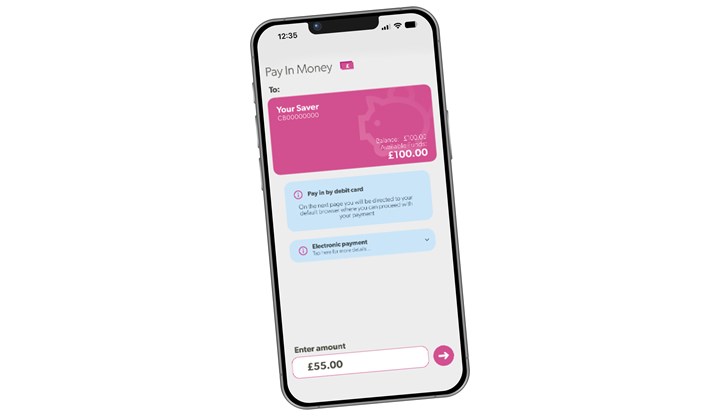
Manage your savings accounts
With the app, you can:
- Check your balance, available funds, interest rate and maturity date
- Check your unused ISA allowance
- Open new savings accounts
- Create and track personalised savings goals
- Transfer money between your accounts*
- Set maturity instructions
- View your nominated bank details for each account
- Personalise your account name
* You can only transfer money to your nominated account. You can't add new payees in the app. If you’d like to set up or change your nominated bank account, please call us on 0345 601 3344 or pop into your nearest branch.
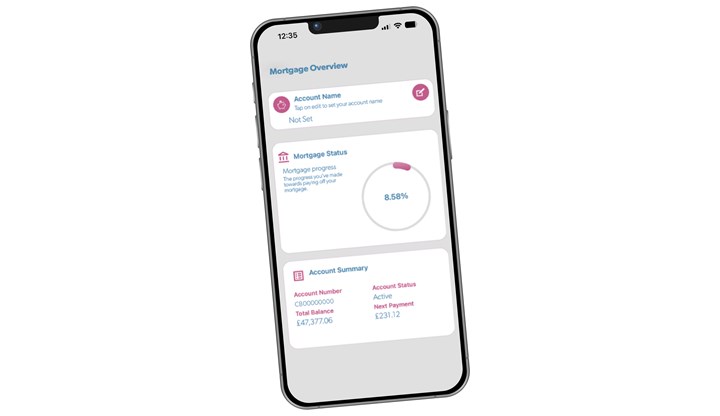
🏡 Manage your mortgage
With the app, you can:
- Check your outstanding balance and next payment
- Track your progress as you pay off your mortgage
- View detailed mortgage information, including interest rate, term end date, revert rate and mortgage deal end date - even if your mortgage is split into different parts
- Estimate your home equity by entering your property value
- Personalise your account with a name that works for you, making it easier to keep track - especially if you have more than one mortgage
Manage your details
You can also manage your details, access important information and get support when you need it.
Use fingerprint or face ID to log in quickly
You can use biometric login (such as fingerprint or face recognition) to quickly and securely access The Cambridge money app.
When you first log in, you'll be prompted to enable biometric login if your device supports it.
You can turn this on and off at any time in the app settings. Select the three dots in the top right corner, choose the person icon, and go to the security section to enable or disable biometric login.
Keeping your money and details safe
Our app is designed with security at its heart. It allows you to send us secure messages to safely manage your account — whether that’s transferring money, requesting a new passbook, or making changes to your savings or mortgage account — without needing to call or visit a branch.
Our services are tested by independent experts to help keep your details and money safe, and no banking data is stored on your device.
To stay protected, make sure you keep your device and app up to date, use strong and unique passwords, and never share your login details with anyone.
We’re always working to improve the app and introduce new features, so keeping it updated will ensure you’re getting the most out of our services.
You can find more tips on how to stay secure here.
Have a question?
If you have any questions or need a bit of extra support, just get in touch - we'll be here to help.
You can pop into your local branch, call us on 0345 601 3344 or email us at: thecambridge@cambridgebs.co.uk.
Share this
Send me details
of the The Cambridge money app
If you do not receive the email with the information attached in a few minutes, please check your "junk mail" or "spam" folder.
We promise not to give your email to anyone else or use it for any other purpose than delivering the requested information.